
本当はバージョン違いの MySQL を同時に動かす魂胆でしたが
なかなかうまく行かず、面倒になったのでアップグレードにしました。
これはその時の備忘録です。
前提環境
| 項目 | 値 |
|---|---|
| OS | CentOS 6.8 |
| MySQL(アップグレード前) | 5.1.73 |
| MySQL(アップグレード後) | 5.7.17 |
MySQL をバージョンアップ
MySQL の公式サイト から CentOS 6 用のリポジトリをダウンロードします。
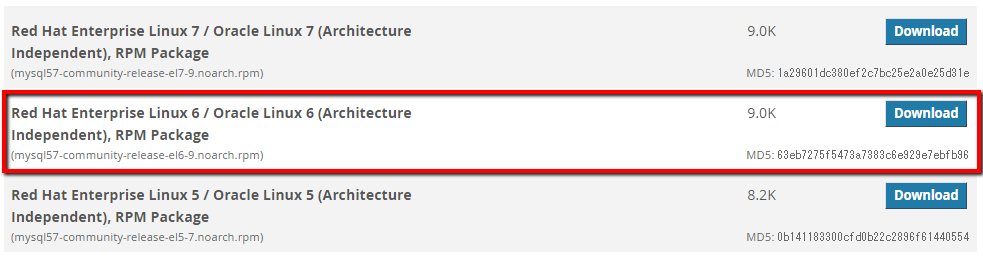
CentOS のバージョンと Red Hat Enterprise Linux のバージョンは同じなので、
Red Hat Enterprise Linux 6 のリポジトリを探します。
# rpm -ivh https://dev.mysql.com/get/mysql57-community-release-el6-9.noarch.rpm
MySQL をフォルダごとバックアップ。mysql フォルダをとりあえず mysql_51_bak という名前でコピー。
# sudo cp -arpf /var/lib/mysql/ /var/lib/mysql_51_bak/
MySQL を停止します。
# /etc/init.d/mysqld stop
MySQL をアップデート。
# yum update mysql-server
実行するとずらずらーっと表示されるので、すべて y を押します。
警告: rpmts_HdrFromFdno: ヘッダ V3 DSA/SHA1 Signature, key ID 5072e1f5: NOKEY
Retrieving key from file:///etc/pki/rpm-gpg/RPM-GPG-KEY-mysql
Importing GPG key 0x5072E1F5:
 Userid : MySQL Release Engineering <mysql-build@oss.oracle.com>
 Package: mysql57-community-release-el6-9.noarch (installed)
 From   : /etc/pki/rpm-gpg/RPM-GPG-KEY-mysql
これでいいですか? [y/N] y
Complete! と出れば成功です。
mysql_upgrade 実行
一度 mysqld を起動するのですが、
自分の環境では下記のエラーが発生し、MySQL が起動できませんでした。
[ERROR] Fatal error: mysql.user table is damaged. Please run mysql_upgrade.
[ERROR] Aborting
そのため セーフモード(ユーザ認証なし) で起動し、mysql_upgrade コマンドを実行します。
MySQL をセーフモードで起動:
# /usr/bin/mysqld_safe --skip-grant-tables &
セーフモードで起動後、テーブルをアップグレード:
# mysql_upgrade -u root -p
Enter password:
Checking if update is needed.
Checking server version.
Running queries to upgrade MySQL server.
Checking system database.
.
..
...
Upgrade process completed successfully.
Checking if update is needed.
成功したようです。
TIMESTAMP のデフォルト値警告対策
my.cnf に以下を追加します。
MySQL 5.6 以降では暗黙のデフォルト値として TIMESTAMP 型を使用することが非推奨のため、
この設定をしないと WARNING が発生する、とのこと。
# vi /etc/my.cnf

[mysqld]
explicit_defaults_for_timestamp = true
MySQL を再起動します。
# service mysqld restart
動作確認
MySQL に接続できるか確認。
# mysql -u root -p
Enter password:
Welcome to the MySQL monitor.  Commands end with ; or \g.
Your MySQL connection id is 4
Server version: 5.7.17 MySQL Community Server (GPL)

Copyright (c) 2000, 2016, Oracle and/or its affiliates. All rights reserved.

Oracle is a registered trademark of Oracle Corporation and/or its
affiliates. Other names may be trademarks of their respective
owners.

Type 'help;' or '\h' for help. Type '\c' to clear the current input statement.

mysql>
おー、うまく行きましたね。
バージョンも確認:
# mysql -V
mysql  Ver 14.14 Distrib 5.7.17, for Linux (x86_64) using  EditLine wrapper
MySQL のバージョンも 5.7 まで上がりました。よかったです。


